Beta · Invite Only · Free During Testing

You're in. Welcome to the INGOT testing phase.

INGOT is two connected apps: a dashboard you run from your laptop, and a workout app your clients get on their phone — branded with your name, logo, and colors, and synced in real time. You were invited because your feedback shapes what gets built next.

Start Free Testing Account

No credit card. No commitment. Pricing comes later — testers keep early-access perks.

A trainer dashboard

Build programs, track every client, see who needs attention, and run your business from one screen.

Their app, your brand

A free workout app for your clients — white-labeled with your name, your logo, your colors. They see your gym on their home screen, not INGOT.

Everything you actually need

Programs, messaging, schedule, reports, branding. No bloat, no upsells, no surprise add-ons.

9
Major features live
100%
Branded as yours
Programs + clients
$0
During beta
How it works

Two apps. One system.

You get a trainer dashboard — built for a laptop, where you program, message, and run your business. Your clients get a branded workout app on their phone. They're linked: assign a program and it's on their phone instantly — they finish a set, and you see it on your dashboard live.

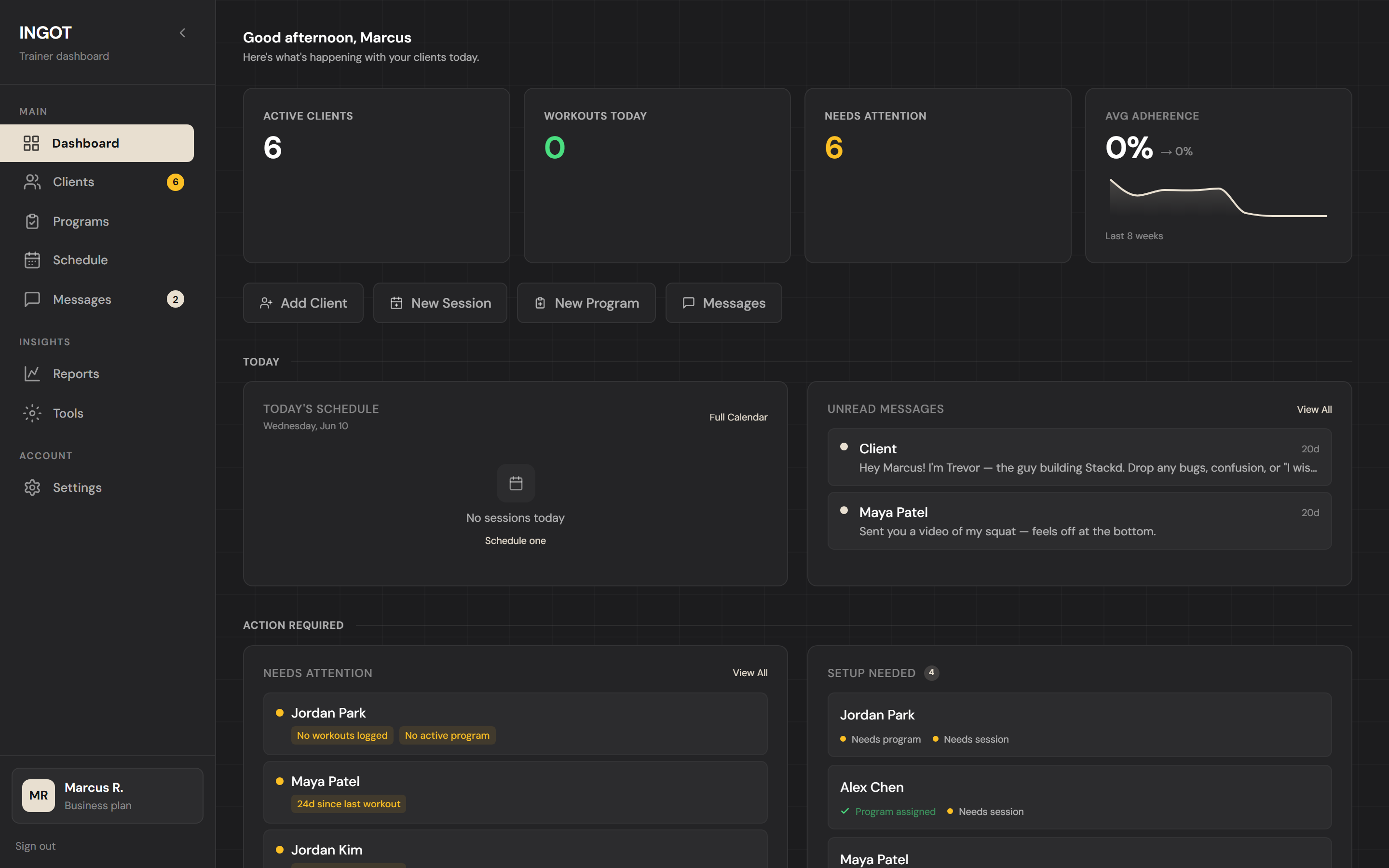
The INGOT trainer dashboard — every client, program, and message at a glance
YouTrainer dashboard · laptop or desktop
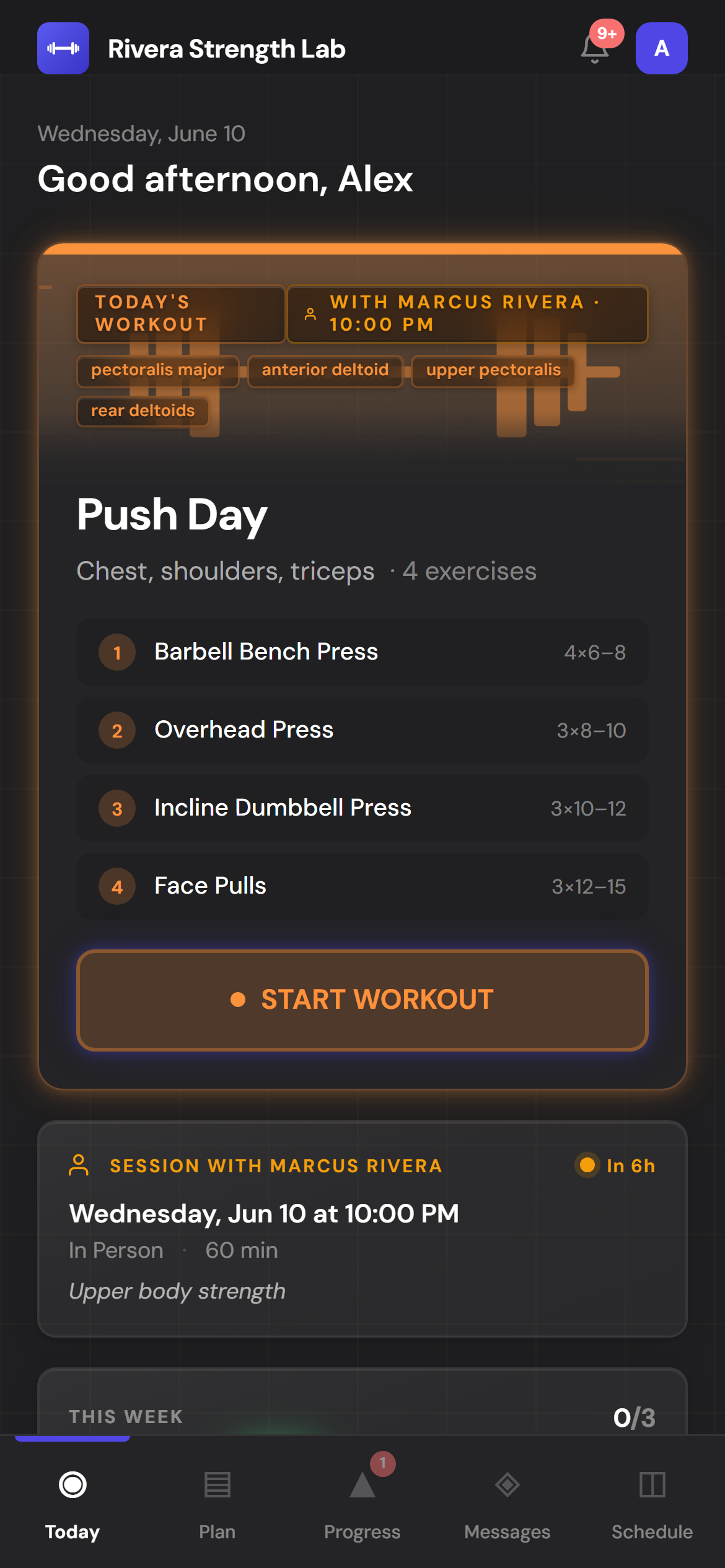
The client's workout app — branded with the trainer's name and colors
Your clientBranded workout app · phone
Your dashboard
Laptop or desktop · web

Where you run the business. Stays INGOT — it's your tool.

  • Build & assign programs (or generate with AI)
  • Track every client — progress, streaks, who needs attention
  • Message clients and schedule sessions
  • Reports, PRs, and PDF program export
  • Set your branding — logo, colors, business name
Their app
Phone · installs like a real app

Branded as you — they see your gym, never "INGOT."

  • Today's workout, ready to start
  • Log every set with a built-in rest timer
  • Their history, streaks, and personal records
  • Message you and get weekly check-ins
  • Installs to their home screen with your logo
What's inside

The whole platform, walked through

Every screen below is rendered the same way it looks in the real app — same components, same colors, same animations.

Dashboard · Home

The pulse of every client, on one screen.

Sign in to a snapshot of your business: today's sessions, who's missed a workout, who's on a streak, and who needs a check-in. No hunting through tabs.

  • KPI cards — active clients, sessions today, attention count, adherence trend
  • Quick actions for the four things you do most
  • Today timeline, attention list, unread messages, recent PRs
  • Real-time updates the second a client finishes a set
dashboard.ingot.fit / dashboard
The INGOT trainer dashboard — clients, sessions, and activity at a glance
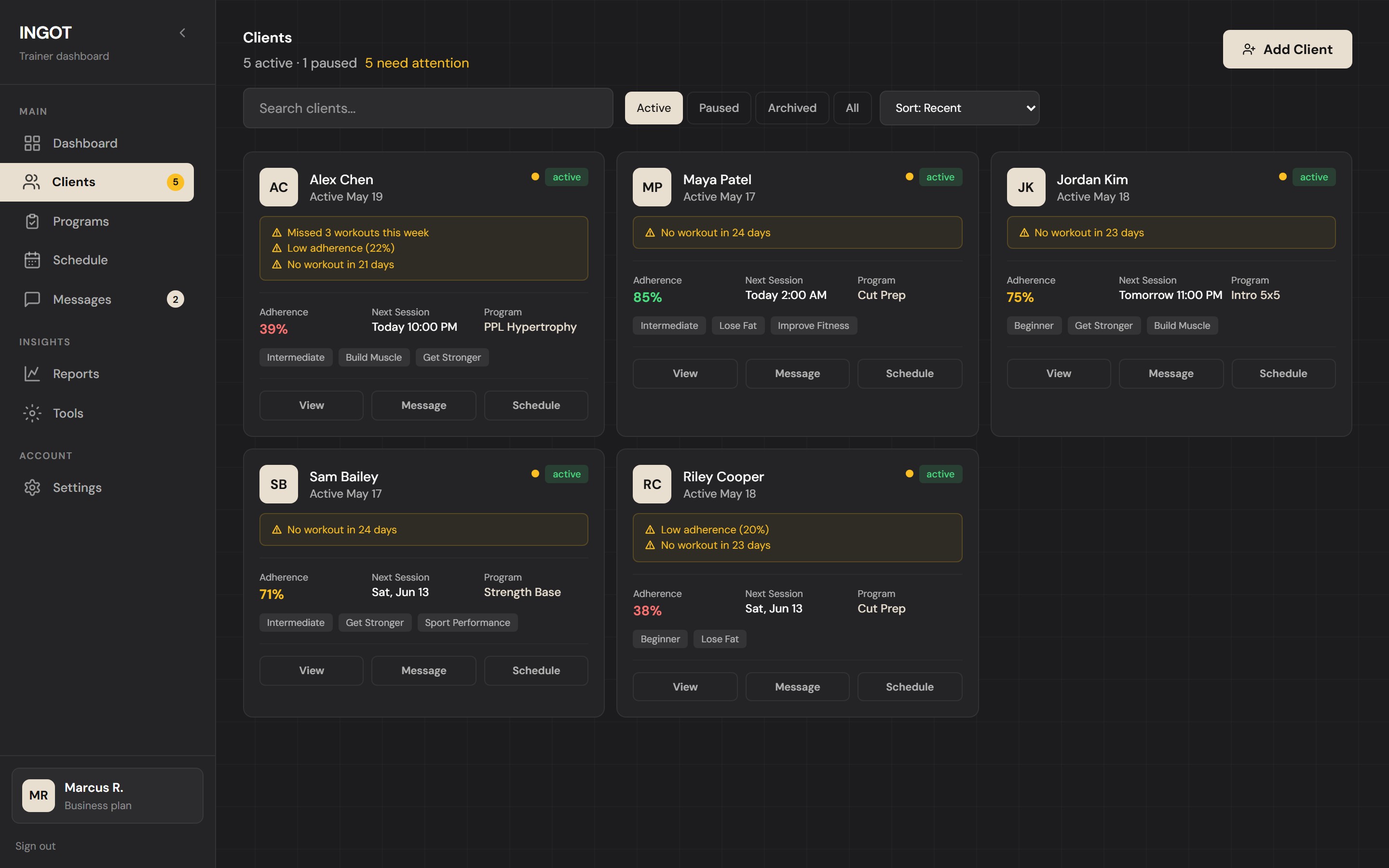
Clients

Every client, every detail, every history.

Card-based roster with the info you actually need at a glance — current program, adherence, next session, attention reasons. Click into the full profile for history, messages, notes, and progress.

  • Status pills + sort (recent, name, adherence, needs attention)
  • Attention reasons spelled out — not just a vague warning dot
  • Adherence, next session, and active program inline per card
  • One-click View / Message / Schedule from the card
dashboard.ingot.fit / clients
Clients list — adherence, programs, and who needs attention
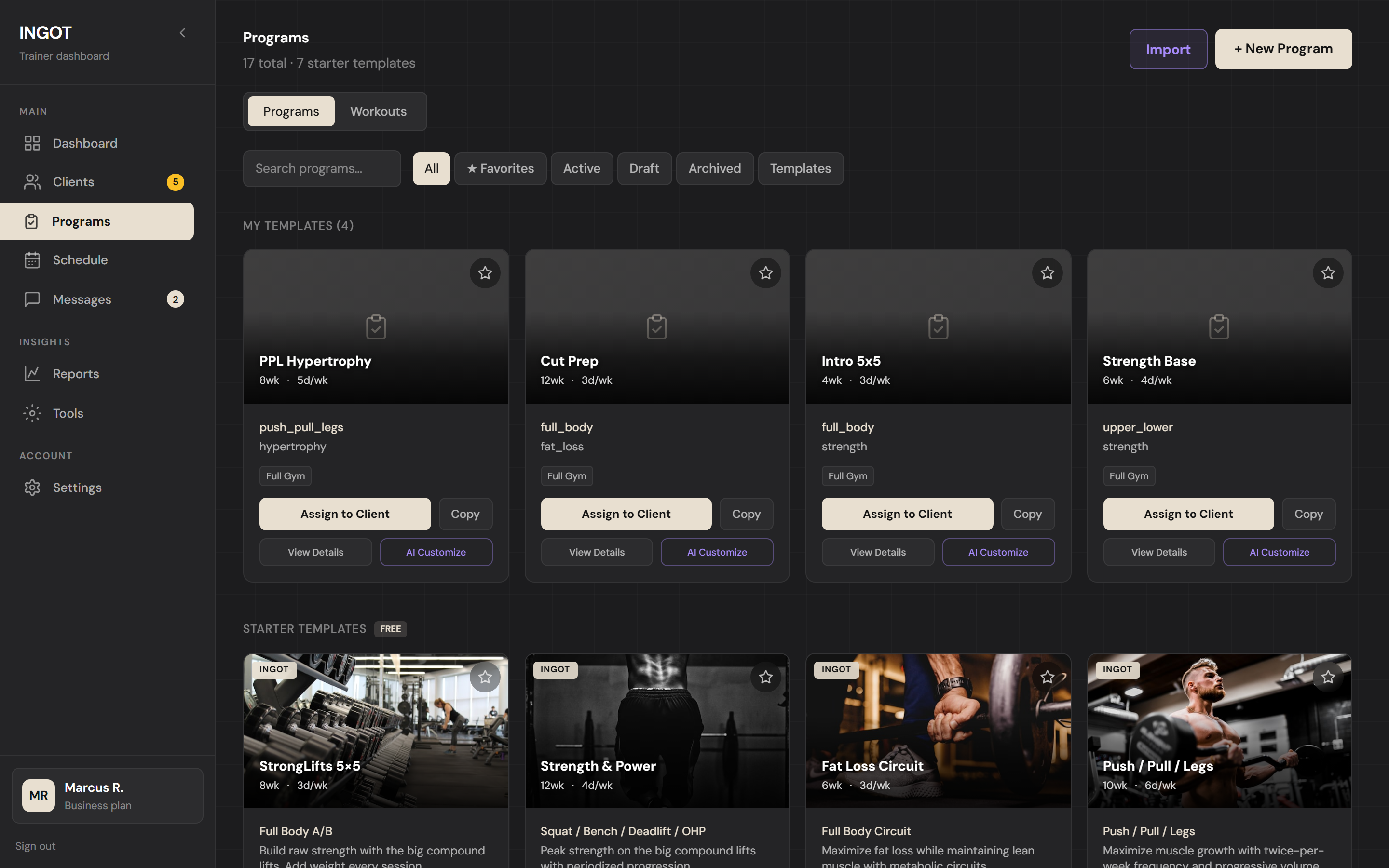
Program Builder

Build a program once. Reuse it forever.

A guided 4-step flow with week-by-week editing. Every day is a themed hero card — the same look your clients see in their app — so the program you build is the program they experience.

  • 4-step stepper: Setup → Build → Overview → Save
  • Per-day theme picker drives banner color, gradient, and animation
  • Sets, reps, rest, intensity (RPE / %1RM / RIR), coaching notes per exercise
  • Supersets, deload weeks, copy/paste week, AI generation
  • Save as template, assign to client, export to PDF
dashboard.ingot.fit / programs / builder
Your reusable program templates
Client App · PWA

Your clients get a real app. For free.

INGOT installs to their home screen, works offline mid-set, and syncs every rep the second connection comes back. No app store. No paywall they hit later. The hero card glows in the workout's theme color and animates its own SVG — so they actually want to open it.

  • "Today" hero with theme-colored glow, animated SVG, muscle tags
  • Live set logging, rest timer, exercise swap, skip-rest
  • Streak indicator, weight/PR tracking, makeup workouts
  • Branded with your colors, your logo, your gym
9:41
Wed, May 20Big day, Sarah
12 workout streak
★ PR Attempt
Bench 230 lb
PR Day
Test set above your 1RM — go get it
1
Bench warmup
3×5
2
Bench Press
1×1 @ 230
3
Back-off sets
3×5 @ 80%
Current 1RM
225 lb
↑ 18 · 8wk
Target today
230 lb
+5 lb · new PR
Today
Program
Coach
Profile
White-Label · Built In

Their app. Your brand.

Upload your logo and pick your color once. Your clients install INGOT as a real app — your logo becomes their home-screen icon, and your name and colors carry across every screen inside.

9:41
The trainer's logo as the installed app icon
Rivera Strength
On their home screenThey install it like any app — your logo, front and center.
The client app, branded with the trainer's logo and color
Inside the appYour logo in the header, your color on every screen.
Rivera Strength LabYour training app is ready
via INGOT
You're invited

Welcome, Alex.

Marcus Rivera at Rivera Strength Lab just set up your training account. Here's how to get in:

Emailalex@email.com
Temp passwordk7m2-xq9w
Log in to your app
Even the welcome emailSent in your colors, under your name.

Set it once in Settings → Branding — logo, color, business name. It applies across every client's app instantly.

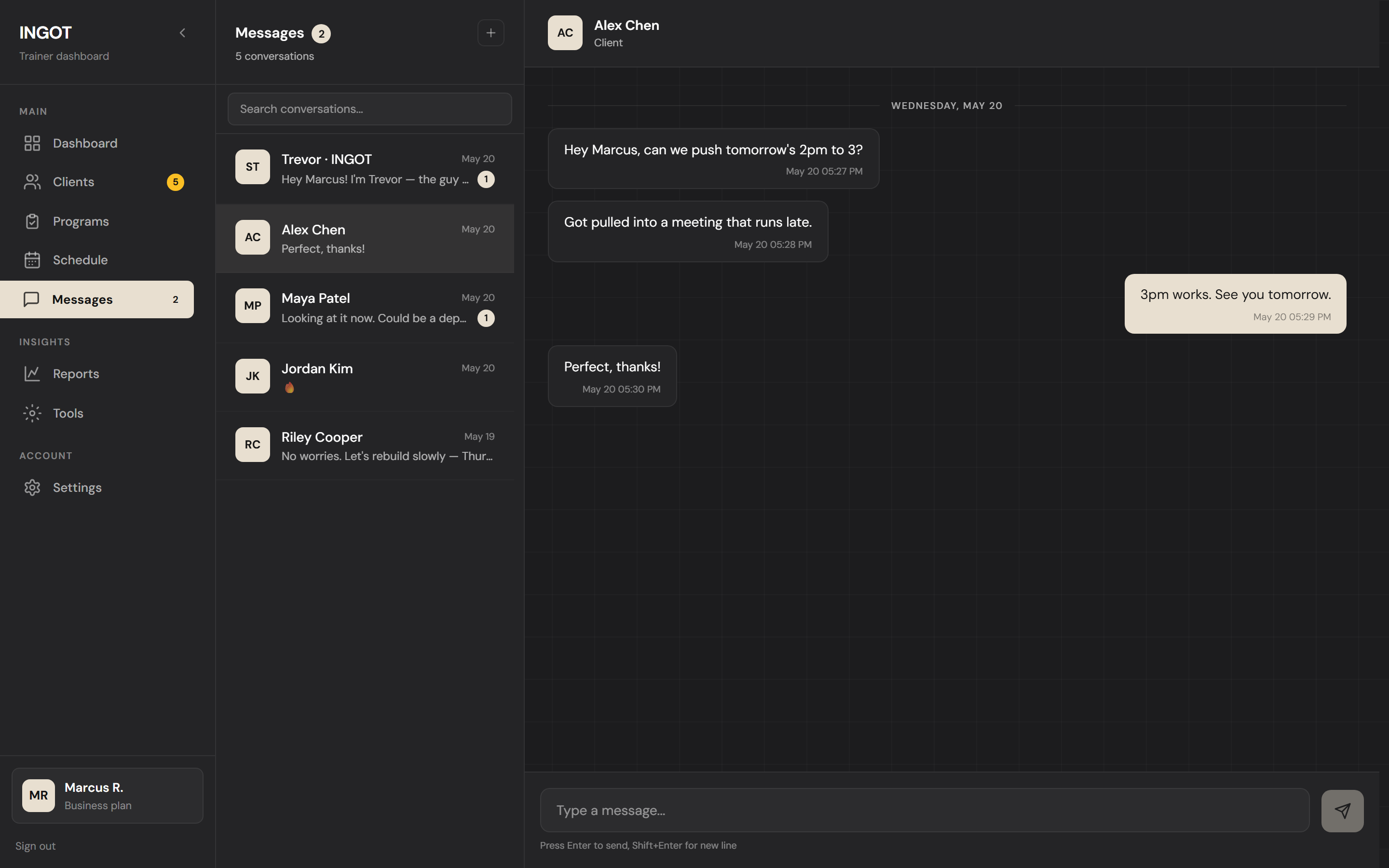
Messages

One inbox. Every client. Every conversation.

No more juggling DMs across Instagram, WhatsApp, and SMS. Clients message you from inside the app, you reply from inside the dashboard — searchable, threaded, and tied to their profile.

  • Unified inbox across all clients (and gym owners on a gym plan)
  • Real-time delivery — no refresh needed, Supabase realtime under the hood
  • Quick context: see their current program right inside the thread
dashboard.ingot.fit / messages
One inbox with every client conversation
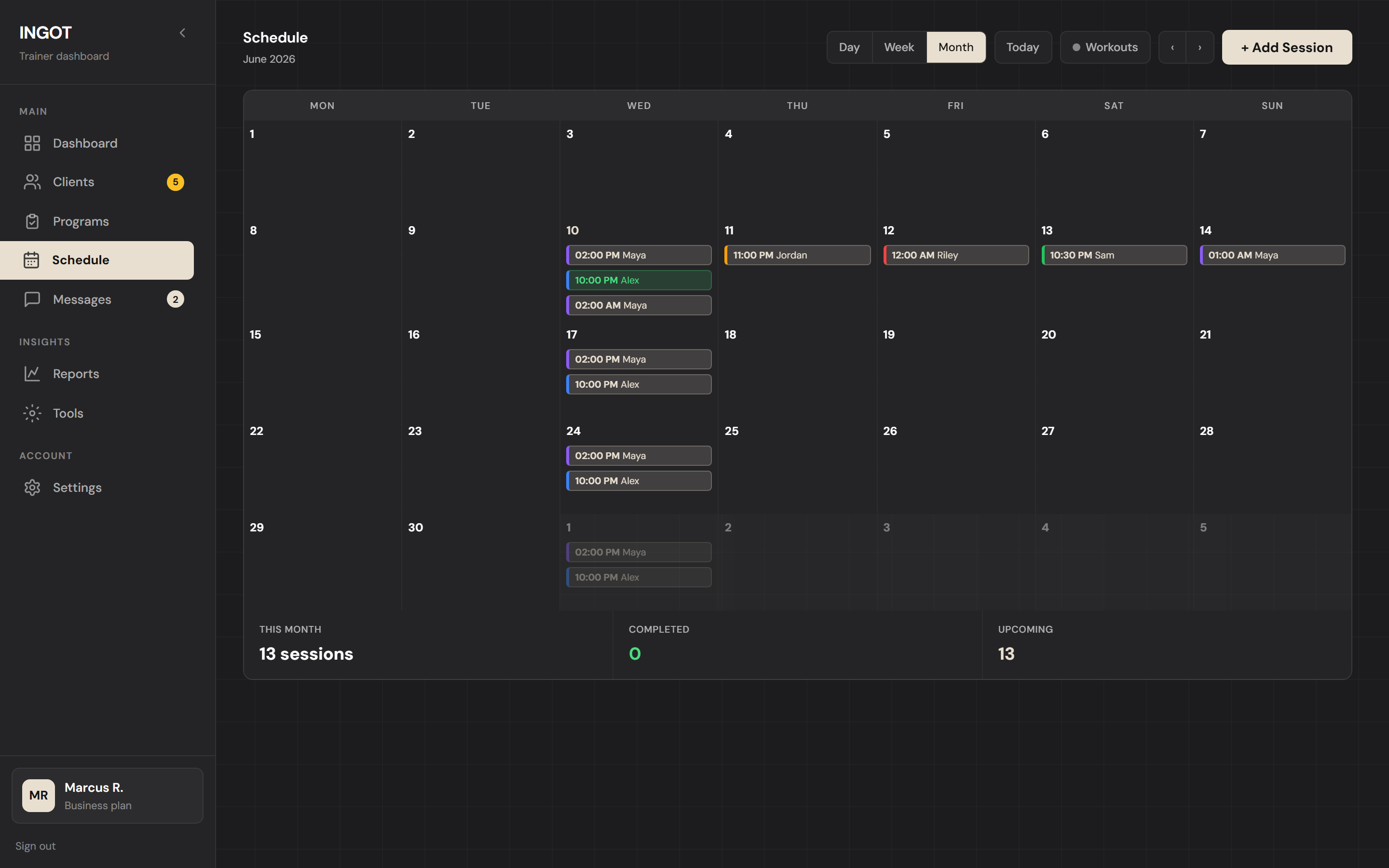
Schedule

Every session, in-person or virtual, in one calendar.

Month view by default — because you plan in months, not days. Click a date to see who's training when, drag to reschedule, and clients see updates instantly in their app.

  • Month, week, and day views — month is the default
  • Color-coded by workout type with the same theme palette
  • Client reschedule requests land directly in your inbox
dashboard.ingot.fit / schedule
Every session in one calendar
Reports

Hard numbers, not vibes.

Volume, intensity, and adherence trends per client and across your roster. Spot plateaus before they become problems and prove progress when clients can't see it themselves.

  • Estimated 1RM progression per lift, with deltas
  • Weekly volume per muscle group, week over week
  • Adherence and streak — scoped to current program, not lifetime
  • Exportable for client check-ins
dashboard.ingot.fit / reports

Weekly Reports

Send clients a weekly check-in with their stats and your feedback
+ New Report
New Report · Sarah Kim
Stats below auto-calculate from her logged workouts this week
Workouts
6 / 6
Adherence
100%
Volume
14.2k lb
PRs
2
Weight Δ
+1.5 lb
Weekly Summary
Great consistency this week — every session logged on time. Bench moved up 5 lb at RPE 8, squat felt smooth at 75%. Volume up 34% from last block.
Trainer feedback
Locked in. Ready to bump intensity next week — let's chase that 230 lb bench.
History
JT
Jess Thompson
May 13 — May 19
Sent
Workouts: 5 / 6
Adherence: 83%
Volume: 9.4k lb
PRs: 1
Weight Δ: +0.6 lb
"Big week on hinge patterns — RDL form is finally clicking. Take Sunday completely off, you've earned it."
MR
Mike Rodriguez
May 13 — May 19
Draft
Workouts: 4 / 5
Adherence: 80%
Volume: 11.8k lb
PRs: 0
Weight Δ: flat
Your job as a tester

What we're listening for

You're not a customer right now — you're a co-builder. Here's what'll move the product fastest.

Bugs & broken flows

Anything that crashes, stalls, doesn't save, looks wrong, or just feels off. Screenshots help — but a quick description is plenty.

UX friction

Steps that took too many clicks, things you couldn't find, screens that confused a client. Friction is the most fixable feedback we get.

Missing features

What does your current workflow need that INGOT doesn't have yet? Tell us. Beta feedback shapes the roadmap directly.

What's working

Just as useful — tell us what feels right so we don't accidentally break it. The flows you actually use are the ones we'll protect.

Where things stand

Live now, coming next, on hold

Honest status, no marketing spin. The beta gets the truth.

Live now

Everything walked through above. Dashboard, clients, program builder with themed day cards, client PWA with live tracking, messaging, schedule, reports, branding, AI program generation, PDF export, branded onboarding email. Use it all.

Coming next

Tutorial videos and a written wiki. So you don't have to figure out every flow by clicking around. Also: deeper analytics, body-metric tracking, and habit/check-in tools.

What gets built after that depends on what you tell us. The point of a beta is that the loud asks win. Email us directly with anything — feature request, bug, or "this is confusing."

Ready to test it?

Free testing account. Full access to every feature above. We'll be in touch before anything ever becomes paid, and testers keep early-access perks.

Start Free Testing Account

No credit card. No commitment.